
Why HyperDB?
There is no shortage of state libraries for TypeScript, so it is fair to ask what problem HyperDB is trying to solve. The short version: local-first apps need efficient indexed data structures, precise invalidation, and a data layer that can also run on the backend.
This page explains those constraints. If you want to get going, skip to How HyperDB Works and the Quickstart.
The data-structure problem
Section titled “The data-structure problem”Local-first apps lean heavily on sorted collections. With fractional indexing you keep items ordered by giving each one an order token between its neighbours, so reordering or inserting an item should touch a small amount of data. That only holds if the underlying data structure can insert into a sorted collection efficiently.
Redux and MobX both store collections as plain sorted arrays, and a sorted array is the wrong shape for this:
- Redux is immutable by design. Inserting one item into a sorted list means
allocating a new array containing every existing element plus the new one.
That is
O(n)work andO(n)garbage on every single insert. - MobX is better, because you mutate in place rather than rebuild. But
splicing a value into the middle of a sorted array still has to shift every
element after the insertion point, so under the hood it is still
O(n).
A B-tree is the standard data structure here: ordered iteration, range scans,
and O(log n) inserts and deletes. Neither Redux nor MobX gives you one.
HyperDB is, at its core, a B-tree wrapper: every table is backed by a
B+tree, so inserting one item into a sorted set of
a hundred thousand does logarithmic work instead of linear work.
The notification problem
Section titled “The notification problem”The second problem shows up as your app grows.
In Redux, every dispatch notifies every connected selector, which then has to
recompute and compare its result to decide whether its component should re-render.
That is O(n) in the number of selectors, regardless of how small the change was.
On a large screen with thousands of live selectors, a single keystroke can mean
thousands of recomputations.
MobX solves this with fine-grained observation: it tracks which observables
each computed value read, so only the affected ones re-run. HyperDB does the same
thing, but at the level of data ranges instead of object fields. Because every
selector reads through indexes, the runtime records exactly which index ranges it
scanned. When a mutation commits, only the selectors whose ranges actually contain
the changed rows re-run. See Selectors & Reactivity.
A write to projectId = "p2" does not wake a selector that read
projectId = "p1".
So you get MobX-style granularity (with one caveat: tracking is at the
range/row level, not per individual field), without MobX’s downside. MobX
relies on mutable, observable objects and asks you to wrap components in
observer(). HyperDB does not hand out proxies: every row it gives back is
plain, immutable data,
frozen by the in-memory driver, and deep-frozen end to end when
you opt in with freezeRows. That means it works with React’s rendering
model directly, with no observer() and no proxies leaking into your view layer.
The backend problem
Section titled “The backend problem”Imagine you have a local-first app and now need a server, to validate writes, to run the same business logic authoritatively, or to merge changes from many clients. With Redux or MobX you usually have two options:
- Load everything into memory and run your selectors and actions against it. This works for one user, but a server holds many users’ data at once. Keeping it all resident is memory-hungry and adds real startup latency while you hydrate it.
- Reimplement the logic in SQL or some other backend stack. Now you maintain two copies of the same rules, and every divergence is a bug waiting to happen.
HyperDB avoids that split. Because a table is a B-tree, and B-trees are what many databases are built on, the same schema, selectors, and actions can run against a persistent store on the server. Today that store is SQLite (MongoDB and PostgreSQL are not supported for now). The runtime reads through the database’s own indexes and pulls in only the rows a given selector or action touches; it does not hydrate the whole dataset into memory. You can share data logic between the client and server. The Sync Engine guide outlines a server using the same change-tracking code as clients.
Synchronous on the frontend
Section titled “Synchronous on the frontend”On the frontend, against the in-memory driver,
selectors and actions execute synchronously, start to finish, with no
await in the middle. This is the whole reason HyperDB is built on
generators: a generator can describe code that runs either
synchronously or asynchronously, so the same selector or action works against a
sync in-memory driver and against an async driver like IndexedDB without being
rewritten.
When the driver is synchronous, the runtime does not yield back to the event loop in the middle of a read or a write. There’s no microtask hop, no promise to schedule, no frame where the work is half-done. A dispatch runs to completion and the result is available immediately, so a click can update the store and the UI in the same tick. This keeps the interactive path out of the promise/microtask queue.
You keep the async path for what needs it (persistence, IndexedDB, server SQLite), but the interactive hot path, the in-memory tier that the UI reads and writes, stays fully synchronous and responsive.
That same generator flexibility opens up a middle ground. A hybrid mode is in development: instead of loading everything into memory up front, a read checks the in-memory tier first and, on a miss, runs the same query against IndexedDB and caches the rows back into memory. Because a selector is just a description, it runs unchanged either way: you trade synchronous reads for async ones, but startup stays quick and memory stays low, since data is pulled in lazily, on demand. Writes still commit synchronously for anything already cached. It’s the same selectors and actions, executed against two tiers instead of one.
Why not just run SQLite in the browser?
Section titled “Why not just run SQLite in the browser?”If the same selectors and actions already run on server SQLite, the natural question is why not run SQLite in the browser too, shipping one SQL dialect to both ends, the way PowerSync and similar tools do. HyperDB can persist to IndexedDB instead. Here’s the reasoning.
SQLite in the browser is heavy. A browser has no native SQLite, so you ship a
WebAssembly build, a binary the user downloads and instantiates before the app
can read a single row. Then every read and write crosses the JS↔WASM boundary,
encoding and decoding strings each way(waiting for native wasm string support!). And because HyperDB is schemaless at the
storage layer (rows are documents, not columns under a fixed SQL schema), values
are stored as JSON, so each row also pays JSON.stringify on the way in and
JSON.parse on the way out. Each cost is small in isolation, but they add up on
hot paths.
IndexedDB is a good fit for this storage layer. It’s a native, document-oriented store with indexes, which matches HyperDB’s storage model, with no WASM to ship and no OPFS or IndexedDB-VFS layer to route SQLite through. Its raw API is awkward, but the IndexedDB driver hides it behind the same schema, selectors, and actions you use elsewhere.
One practical setup is to run two HyperDB stores in the browser: an
in-memory one the UI reads and writes
synchronously, and an IndexedDB one for durability. Load everything from
IndexedDB into memory on startup, then let every action run synchronously against the
in-memory store while a SubscribableDB hook replicates each
insert, upsert, and delete into the IndexedDB store in the background. Selectors
and actions stay synchronous while the data is still persistent. The
In-Memory + Persistence guide builds this
setup step by step.
SQLite also does not provide the same reactivity signal. Even setting the bundle and serialization costs aside, a SQL query carries no record of which ranges it read. When any row in a table changes, you have no direct way to know which subscribed queries it could have touched, so you re-run all of them. That’s the notification problem all over again. HyperDB tracks the exact index ranges each selector scanned, so a write wakes only the selectors that overlap it. The in-memory HyperDB tier gives you range-tracked reactivity without needing to infer dependencies from SQL.
Every query is observable
Section titled “Every query is observable”Because reads go through declarative queries rather than ad-hoc property access, HyperDB records what each selector and action did: which indexes were scanned, how many rows came back, and how long each step took. It surfaces all of that in a built-in devtool.
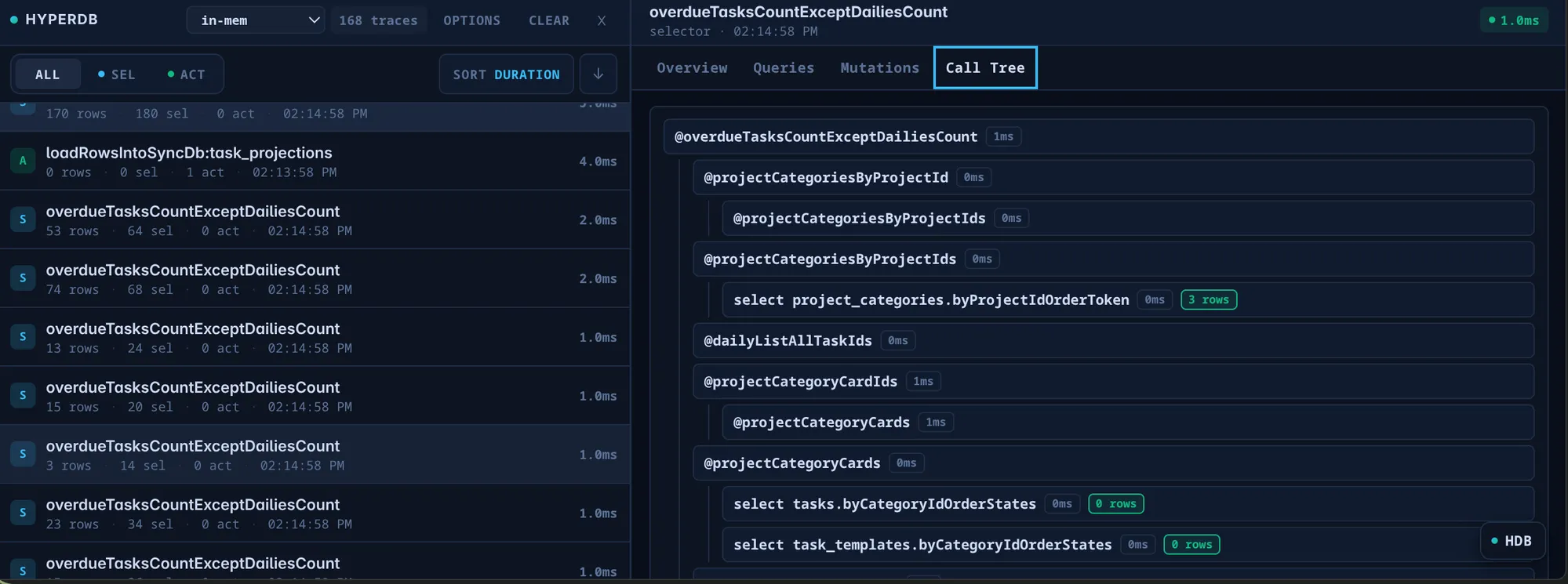
Each dispatch and selector run becomes a trace you can sort by duration. Open
one and you get a full call tree: the selector at the top, every nested
selector it composed, and at the leaves the actual index reads, like
select project_categories.byProjectIdOrderToken → 3 rows, each annotated with
its own timing and row count. When a view is slow, you can see precisely which
sub-query or which index is responsible, instead of guessing.
This kind of insight comes from reading data through queries. A state library where components reach into plain objects has nothing to trace; HyperDB’s declarative reads give it a complete, structured picture of every computation.
It’s still just JavaScript
Section titled “It’s still just JavaScript”A fair worry about “use a database on the backend” is that it means writing SQL and thinking in query languages. HyperDB doesn’t ask that of you. You write ordinary JavaScript (loops, conditionals, function calls) in your selectors and actions. What HyperDB provides underneath is fast indexed lookups and inserts, not a query language to learn. The mental model is the same on the client and the server: plain JS logic over typed, indexed, reactive data.
In short
Section titled “In short”HyperDB exists because local-first apps need:
| Need | Redux | MobX | HyperDB |
|---|---|---|---|
| Cheap inserts into sorted data | O(n) (new array) | O(n) (array shift) | O(log n) (B-tree) |
| Update only affected selectors | O(selectors) per dispatch | Fine-grained | Fine-grained (range-tracked) |
| Works with React without hacks | Yes | Needs observer() | Yes |
| Runs the same code on the backend | No | No | Yes (only SQLite for now) |
| Per-action/selector + query tracing & call tree | None | None | Built-in devtool |
If those rows describe problems you have, the rest of these docs show how HyperDB solves them. Start with How HyperDB Works.